How to test a GitHub webhook on localhost over HTTPS
Practical guide to receive a GitHub POST on localhost, expose it through a DevProxy HTTPS tunnel, verify X-Hub-Signature-256, and confirm a 2xx response.
Updated:
Contents
You will receive a GitHub POST at a local address, verify the request signature, and see a 2xx response. The setup has five short steps: start a receiver, test it locally, expose it through a dedicated DevProxy HTTPS tunnel, configure GitHub, and inspect the delivery.
GitHub  →  https://CURRENT-TUNNEL-ADDRESS/webhook
        →  DevProxy
        →  http://127.0.0.1:8765/webhook
        →  204 No Content
GitHub signs the exact request body bytes with the X-Hub-Signature-256 header. The example verifies that signature before parsing JSON, because re-encoding JSON before computing the HMAC changes the bytes and produces a different signature.
What you need
- A DevProxy account, the app on your computer, and an access key created with the "Website or API" ready option. See How to start using DevProxy.
- Python 3 and a terminal such as PowerShell, Terminal, or bash.
- A test GitHub repository where you have admin access. Do not use a repository containing real data.
- A separate random secret for the webhook. The DevProxy access key and the webhook secret are different secrets; do not substitute one for the other.
Tunnel condition. Use a dedicated test HTTP tunnel named webhook and turn off its browser-access password screen. If the screen is enabled, GitHub cannot sign in through a browser first and receives 401; the request never reaches the handler. Leave protection on your main site unchanged and do not send its password to anyone; use only the separate test tunnel.
Step 1. Start the local receiver
Create webhook_demo.py and paste the complete code:
#!/usr/bin/env python3
"""Local GitHub webhook receiver."""

from __future__ import annotations

import hashlib
import hmac
import json
import os
import re
import socket
from http.server import BaseHTTPRequestHandler, ThreadingHTTPServer

HOST = "127.0.0.1"
PORT = 8765
MAX_BODY_BYTES = 1024 * 1024
READ_TIMEOUT_SECONDS = 5
SIGNATURE_PATTERN = re.compile(r"sha256=[0-9a-fA-F]{64}")

secret = os.environ.get("WEBHOOK_SECRET")
if not secret:
    raise SystemExit("Set WEBHOOK_SECRET before starting.")
SECRET_BYTES = secret.encode("utf-8")


class WebhookHandler(BaseHTTPRequestHandler):
    timeout = READ_TIMEOUT_SECONDS

    def log_message(self, format: str, *args: object) -> None:
        # Request lines can contain user data; print only the verified event below.
        return

    def reply(self, status: int, text: str = "") -> None:
        self.send_response(status)
        if status != 204:
            body = text.encode("utf-8")
            self.send_header("Content-Type", "text/plain; charset=utf-8")
            self.send_header("Content-Length", str(len(body)))
            self.end_headers()
            self.wfile.write(body)
        else:
            self.end_headers()

    def do_GET(self) -> None:
        if self.path == "/healthz":
            self.reply(200, "ok")
        else:
            self.reply(404, "not found")

    def do_POST(self) -> None:
        if self.path != "/webhook":
            self.reply(404, "not found")
            return

        length_text = self.headers.get("Content-Length")
        try:
            content_length = int(length_text or "")
        except ValueError:
            self.reply(411, "Content-Length required")
            return
        if content_length < 0 or content_length > MAX_BODY_BYTES:
            self.reply(413, "payload too large")
            return

        signature_header = self.headers.get("X-Hub-Signature-256", "")
        # Validate the header before encoding it: arbitrary Unicode must not reach compare_digest.
        if not SIGNATURE_PATTERN.fullmatch(signature_header):
            self.reply(401, "invalid signature")
            return

        try:
            self.connection.settimeout(READ_TIMEOUT_SECONDS)
            body = self.rfile.read(content_length)
        except (TimeoutError, socket.timeout):
            self.reply(408, "request timeout")
            return
        if len(body) != content_length:
            self.reply(400, "incomplete request body")
            return

        expected_signature = b"sha256=" + hmac.new(
            SECRET_BYTES, body, hashlib.sha256
        ).hexdigest().encode("ascii")
        received_signature = signature_header.encode("ascii")
        if not hmac.compare_digest(expected_signature, received_signature):
            self.reply(401, "invalid signature")
            return

        try:
            payload = json.loads(body)
        except (UnicodeDecodeError, json.JSONDecodeError):
            self.reply(400, "invalid JSON")
            return
        if not isinstance(payload, dict):
            self.reply(400, "JSON object required")
            return

        event = self.headers.get("X-GitHub-Event", "unknown")
        print(f"verified event={event}", flush=True)
        self.reply(204)


if __name__ == "__main__":
    server = ThreadingHTTPServer((HOST, PORT), WebhookHandler)
    print(f"Listening on http://{HOST}:{PORT}", flush=True)
    try:
        server.serve_forever()
    except KeyboardInterrupt:
        pass
    finally:
        server.server_close()
First generate a random secret. In PowerShell:
python -c "import secrets; print(secrets.token_urlsafe(32))"In bash, macOS, or Linux:
python3 -c "import secrets; print(secrets.token_urlsafe(32))"Copy the printed value. You will use it both for the local process and in the GitHub form. Then set the environment variable and start the receiver.
PowerShell:
$env:WEBHOOK_SECRET = "PASTE_GENERATED_SECRET_HERE"
python .\webhook_demo.py
bash:
export WEBHOOK_SECRET='PASTE_GENERATED_SECRET_HERE'
python3 webhook_demo.py
The terminal prints Listening on http://127.0.0.1:8765. If WEBHOOK_SECRET is missing, the program exits and says so. PASTE_GENERATED_SECRET_HERE is a user-supplied value, not a ready-made secret.
The receiver accepts POST requests only at /webhook, reads at most 1 MiB, times out a body that arrives too slowly, and returns 204 after checking the signature and JSON. It prints only the event type from the X-GitHub-Event header; it does not print the request body, other headers, or the secret.
Step 2. Test the handler without GitHub
Leave the receiver running in the first terminal. In a second terminal, check the local endpoint:
curl http://127.0.0.1:8765/healthzThe response ok means the process is listening on the expected port.
Create a second file, send_test.py, and paste this compact sender:
import hashlib
import hmac
import json
import os
from urllib.request import Request, urlopen

secret = os.environ["WEBHOOK_SECRET"].encode("utf-8")
body = json.dumps({"zen": "test", "hook_id": 1}, separators=(",", ":")).encode("utf-8")
signature = "sha256=" + hmac.new(secret, body, hashlib.sha256).hexdigest()
request = Request(
    "http://127.0.0.1:8765/webhook",
    data=body,
    method="POST",
    headers={
        "Content-Type": "application/json",
        "X-GitHub-Event": "ping",
        "X-Hub-Signature-256": signature,
        "User-Agent": "local-webhook-test/1.0",
    },
)
with urlopen(request, timeout=10) as response:
    print(response.status, response.read().decode("utf-8"))
In the second terminal, set the same secret and run the sender.
PowerShell:
$env:WEBHOOK_SECRET = "PASTE_GENERATED_SECRET_HERE"
python .\send_test.py
bash:
export WEBHOOK_SECRET='PASTE_GENERATED_SECRET_HERE'
python3 send_test.py
Expect 204 in the sender's terminal and verified event=ping in the receiver's terminal. This confirms local request handling only. It does not yet prove that GitHub can deliver through the tunnel.
Step 3. Start a dedicated HTTPS tunnel
Add a tunnel named webhook to devproxy.yml. The minimal file below covers this exercise. If your file already contains other tunnels, keep them and add only the new list item.
server: https://control.devtunnels.ru
token: YOUR_KEY
reconnect: true
tunnels:
  - name: webhook
    kind: http
    local: http://127.0.0.1:8765
Replace YOUR_KEY with the DevProxy key and run:
devproxy startIn the dashboard, open "Tunnels" and copy the current address shown for the webhook tunnel. Add the path /webhook. For example, the payload URL may look like https://webhook.your-workspace.devtunnels.ru/webhook; the example does not replace the address shown in the dashboard.
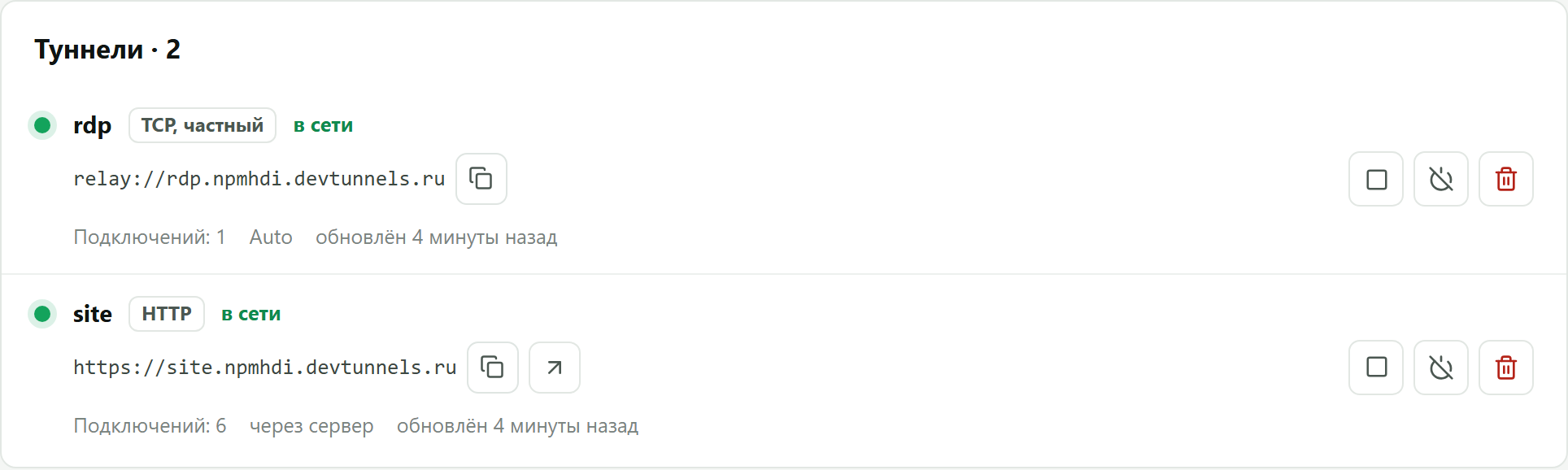
The screenshot shows where the dashboard displays a tunnel address. It is not a screenshot of a webhook delivery. The address works while the current tunnel is running with the current settings; after stopping it or changing settings, the address can change.
Step 4. Add the webhook to a test repository
- Open the test repository and go to
Settings → Webhooks → Add webhook. Admin access is required. - In
Payload URL, enter the dashboard address followed by/webhook. - Set
Content typetoapplication/json. - In
Secret, enter the same random secret assigned toWEBHOOK_SECRET. - Keep
SSL verificationenabled. - Choose
Let me select individual eventsand select only the event you need, for exampleIssues. One event is enough for the first test; GitHub also sends a separatepingafter the webhook is created. - Select
Activeand clickAdd webhook.
GitHub automatically sends a ping after creation. If you selected Issues, open or update a test issue to trigger another delivery.
Step 5. Check the delivery
Go to Settings → Webhooks, open the new webhook, and scroll to Recent Deliveries. A successful delivery has a 2xx response code. The receiver terminal should show verified event=ping or the name of the selected event.
If GitHub reports an error, read the response code in the delivery and compare it with the dashboard address. The Redeliver button can repeat a failed delivery, but it creates another handling of the same event; the demonstration handler deliberately performs no business action.
Troubleshooting
- `401` or `403`. Compare the GitHub secret with
WEBHOOK_SECRET, without extra spaces. Verify the signature against the unchanged raw request body usingX-Hub-Signature-256. If the tunnel has a browser password or cookie gate enabled, it can return401before the local handler runs. Use a separate test tunnel without that gate; do not disable protection on the main site or distribute its password. - `404`. Confirm that the public URL ends in
/webhook, the tunnel points tohttp://127.0.0.1:8765, anddevproxy startis still running. - `400` or `413`. Use
application/jsonand keep the body at or below 1 MiB.400also appears for invalid JSON. - `408`. The client did not send its body in time. For this exercise, run the local test again or redeliver the GitHub event.
- `502`, `504`, or a connection failure. Check that the receiver listens on
127.0.0.1:8765, the tunnel is online, and it forwards to that port. - No delivery appears in GitHub. Check that the webhook is
Activeand that the selected event occurred in the test repository. Apingis sent automatically when the webhook is created.
Limits of the example
- This is a learning receiver. It does not store
X-GitHub-Deliveryand it does not execute business actions. - GitHub does not automatically redeliver failed deliveries: use
Redeliver. A redelivery retains the sameX-GitHub-Delivery; a real handler should recognize duplicates and process events idempotently. - Return
2xxquickly. Put slow work in a queue or a separate worker. - The local sender tests the receiver separately. A real GitHub delivery through an installed tunnel has not been tested in this article;
Recent Deliverieswill provide the first real result.
Sources
- GitHub Docs: Creating webhooks, Validating webhook deliveries, Testing webhooks, Best practices, Redelivering webhooks.
- Python: http.server, hmac, urllib.request.
Try it for free
The free plan covers every scenario in these guides.
More guides
- How to start using DevProxy: account, access key, and installation
- How to show a client a website that runs only on your computer
- How to connect to your work computer from home without a public IP or VPN
- How to open Home Assistant from your phone away from home without port forwarding
- How to watch your home Jellyfin library away from home
- How to use the AI on your home computer from your phone
- How to listen to music from your home computer as your own internet radio
- How to share a folder on your computer by link
- Switching from ngrok to DevProxy: tunnels for everyday work